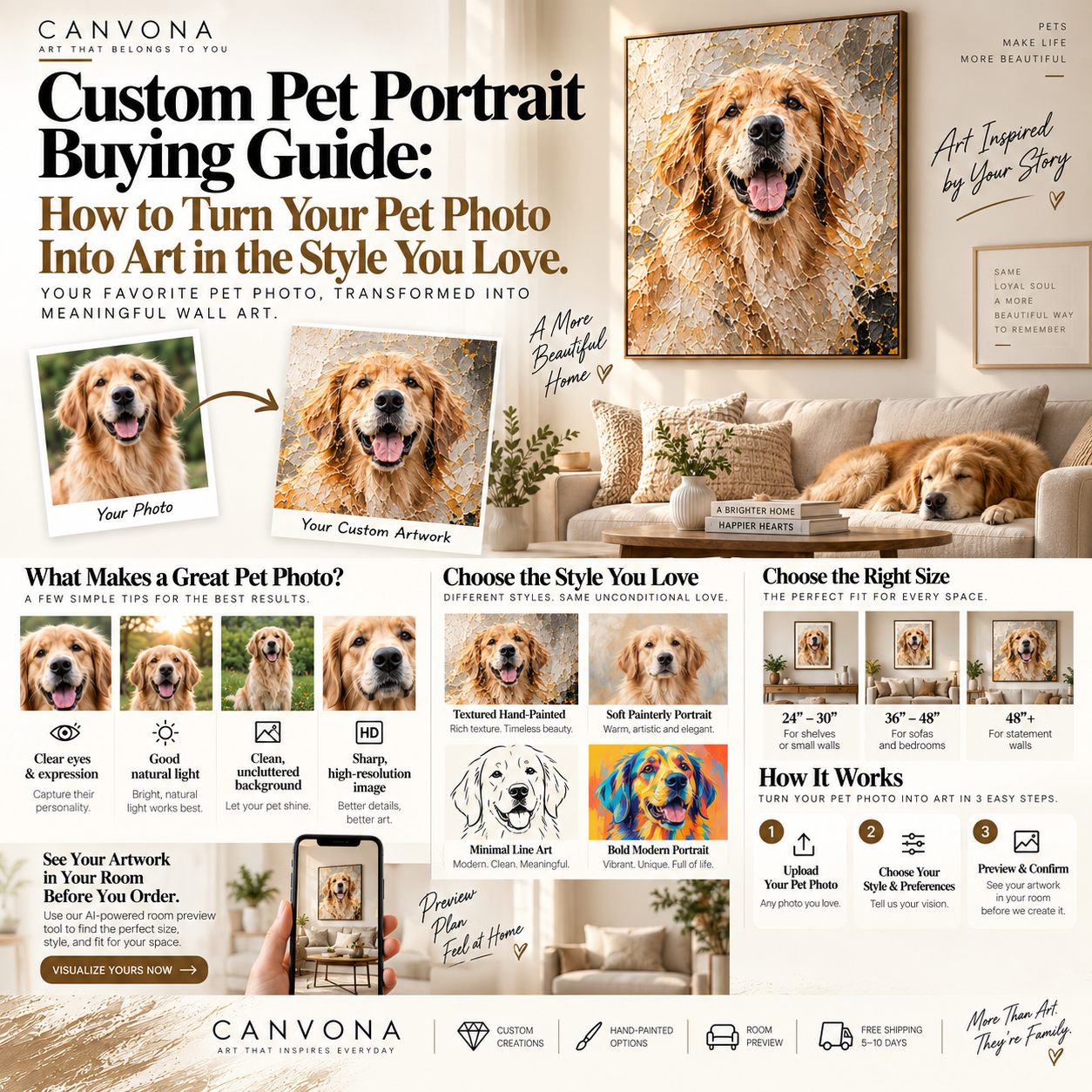
A custom pet portrait should do more than make your dog or cat look like a painting.
It should feel like your pet, while also becoming the kind of artwork you genuinely want to hang in your home.
That distinction is important.
Traditional custom pet portraits usually begin with a simple process:
upload a pet photo,
choose a preset style,
and receive a portrait.
AI-assisted creative tools make something much more flexible possible.
At Canvona, the process begins with one pet photograph.
You can crop that photograph so the AI focuses on the part of the image that matters most.
Then, instead of being limited to a small number of generic filters, you can use an artwork you like as a creative reference and describe—in ordinary language—how you want your pet transformed.
You might say:
Keep my dog's face and expression recognizable, but create the artwork with a warm neutral color palette, large expressive brushstrokes and a simplified textured background similar to the reference artwork.
If the first version is not exactly right, you continue the conversation.
Keep the face, but simplify the body.
Then:
Make the background warmer and less detailed.
Then:
Use larger brushstrokes and reduce the realistic fur detail.
Then:
Keep the current composition but make the eyes closer to the original photograph.
The creative process becomes a conversation between you and the AI model.
You do not need to know how to paint.
You do not need to understand complicated prompt engineering.
You mainly need to know:
what you want to keep, what you want to change, and what kind of artwork you love.
This guide explains how to get better results.
The Canvona AI creation process starts with one uploaded photograph.
That photograph becomes the primary visual reference for your pet.
The AI uses it to understand important characteristics such as:
- face shape;
- eyes;
- ears;
- coat color;
- markings;
- expression;
- body position;
- overall appearance.
Because only one pet photograph is uploaded, choosing the right image matters.
But that does not mean it needs to be a professional photograph.
A good smartphone picture can work very well.
The most important question is:
Does this photograph really feel like my pet?
A technically perfect photograph is not always the best choice.
You might have a sharp, professionally lit photograph of your dog sitting formally.
But perhaps your favorite photo shows your dog with one ear folded down and the exact expression your family recognizes instantly.
That may be the better starting point.
Before looking at resolution or lighting, ask yourself:
Which photograph makes me immediately think, “That's them”?
Look for:
a familiar expression;
a characteristic posture;
recognizable ears;
clear eyes;
distinctive markings;
or something unique about your pet.
For example, your dog may always tilt its head slightly when listening.
Your cat may have a particular way of sitting.
One ear may always fold.
There may be a white patch around one eye.
Those small details are often more important emotionally than having a perfectly posed photograph.
Although personality matters most, a clearer photograph usually gives the AI more useful information.
Whenever possible, choose a photo where:
- the pet occupies a meaningful part of the image;
- the face is reasonably clear;
- important markings are visible;
- the eyes can be seen;
- lighting is not extremely dark;
- the photograph is not severely blurred.
For darker animals, make sure the face does not disappear completely into shadow.
For white pets, avoid extreme overexposure that removes fur detail.
You do not need a studio photograph.
You simply want enough information for the AI to understand the animal.
Cropping is one of the most useful tools in the entire process.
Remember:
The AI pays attention to the image you give it.
If your dog occupies only a small part of a large room, unnecessary visual information can compete with the actual subject.
Imagine your original photograph contains:
your dog,
a sofa,
a television,
a coffee table,
several toys,
a doorway,
and half the kitchen.
But the only thing you care about is your dog.
Cropping the image tightly around the pet helps make that priority much clearer.
A Good Crop Can Help You:
- make the pet larger in the frame;
- remove distracting objects;
- emphasize the face;
- improve composition;
- clarify which subject matters;
- give the AI a cleaner visual starting point.
This is especially useful when the original photo was taken casually rather than specifically for a portrait.
That depends on the artwork you want.
For a Head-and-Shoulders Portrait
Crop relatively close around:
the head,
neck,
and upper body.
Leave enough breathing room so the pet does not feel squeezed into the frame.
For a Full-Body Portrait
Keep the full body visible.
Avoid accidentally cropping:
paws,
ears,
or tail
unless that is intentional.
For a More Artistic Composition
You may crop asymmetrically.
For example, placing the pet slightly to one side can leave space for:
abstract brushwork,
texture,
or color.
The goal is not simply to make the photograph smaller.
The crop helps determine the starting composition.
After choosing and cropping the pet photograph, the next important step is identifying the type of artwork you want.
This is where a reference artwork becomes extremely useful.
Perhaps you already love an artwork because of its:
- brushwork;
- texture;
- colors;
- level of abstraction;
- background;
- composition;
- simplicity;
- or emotional feeling.
Instead of trying to describe all of those qualities from memory, the reference work provides an artistic direction.
Think about the difference between saying:
Make my dog into a modern painting.
and saying:
Use this artwork as the creative reference. I like its broad brushstrokes, warm cream-and-rust palette, simplified background and heavy textured feeling. Keep my dog's identity but create a new artwork with those characteristics.
The second instruction gives the AI much more meaningful information.
It is useful to think about the two inputs differently.
Your Uploaded Pet Photo Answers:
Who is the subject?
The Reference Artwork Answers:
What artistic direction do I like?
Your pet photograph defines identity.
The reference artwork helps communicate style.
This separation is extremely important.
This is one of the most interesting advantages of the process.
Instead of choosing only:
Oil Painting
Watercolor
Cartoon
Modern
you can describe much more specific preferences.
For example:
Keep the dog's face recognizable, but create large palette-knife brushstrokes and reduce the fine fur detail.
Or:
Use a warm cream, mushroom and muted rust palette with a minimal background.
Or:
Make the artwork much more abstract below the dog's shoulders while preserving the eyes and face.
Or:
Create a black-and-white composition with only a small amount of warm gold.
Or:
Make the artwork feel quiet, elegant and contemporary rather than cute or cartoon-like.
Natural language gives you much more creative control.
This is probably the most important idea in the entire process.
Do not expect the first generation to be perfect.
Think of the first result as:
Version 1
You look at it and decide what is working.
Perhaps:
the face is excellent;
the colors are good;
the background is too complicated.
So your next instruction becomes:
Keep the dog, face, expression and colors unchanged. Simplify the background significantly.
Now you have:
Version 2
Perhaps the background is excellent, but the painting still looks too photographic.
Your next instruction:
Keep the current composition and background. Reduce realistic fur detail and use larger, more visible brushstrokes.
Now:
Version 3
Maybe almost everything is right except the eyes.
Next:
Keep everything else unchanged. Adjust the eyes and expression closer to the original uploaded pet photo.
This is the strength of conversational creation.
You are gradually art-directing the image.
One of the most useful habits is explicitly identifying what is already correct.
Suppose Version 3 has:
the perfect background,
perfect colors,
great composition,
but the ears are slightly wrong.
Do not simply say:
Fix the ears.
A better instruction might be:
Keep the current composition, background, colors, brushwork and body exactly as they are. Only adjust the ears to match the original uploaded dog photograph more closely.
This reduces the chance that the next version unnecessarily changes things you already liked.
Pet owners notice things that an AI model—or another person—may not understand are important.
You might care strongly about:
one white paw;
one blue eye;
a particular ear shape;
a dark spot on the chest;
a characteristic facial expression;
a collar;
or another recognizable feature.
Mention these details clearly.
For example:
Preserve the white marking around the dog's left eye and the darker fur on both ears. These features are important.
Or:
Keep the original eye color and the slightly folded left ear.
The more clearly you communicate priorities, the easier it becomes to refine the artwork.
A very useful mental model is to divide your instructions into two categories.
Identity: Preserve Carefully
This may include:
face;
eyes;
markings;
ears;
fur color;
expression;
body shape.
Artistic Style: Change Freely
This may include:
background;
brushwork;
texture;
palette;
degree of abstraction;
lighting;
composition;
mood.
Then your instruction can be extremely clear:
Preserve the dog's facial features, eye color, golden fur and expression. Change the background, brushwork and overall painting style according to the reference artwork.
This helps protect what matters.
Texture is especially difficult to explain using only words.
What does “heavy texture” mean?
What does “expressive brushwork” mean?
Different people imagine different things.
A reference artwork helps make that preference more concrete.
You could say:
I like the large palette-knife marks and thick painted feeling of the reference artwork. Use that type of visual texture, but keep my dog's face recognizable.
Or:
The reference artwork is too detailed for me. I want similarly large brush movement but about 50% less visual complexity.
This makes the process much more precise than simply choosing “oil painting style.”
Color can also be communicated visually.
Imagine your dog photograph was taken outside.
The original image contains:
bright green grass,
strong blue sky,
and a red leash.
But your home contains:
cream,
walnut,
taupe,
black,
and bronze.
You may not want the photographic colors reproduced literally.
You could reference an artwork with:
mushroom,
warm beige,
muted rust,
cream,
and dark brown.
Then tell the AI:
Keep the dog's natural fur colors recognizable, but shift the surrounding palette toward the warm neutral colors of the reference artwork. Remove the bright green and strong blue.
Now the artwork becomes much more compatible with your interior.
Your favorite photograph may have a terrible background.
That does not matter.
Perhaps your dog is sitting beside:
a laundry basket,
a television,
children's toys,
a leash,
or random furniture.
The background does not need to survive.
You can say:
Keep the dog as the main subject and remove the original room background. Replace it with a simple textured cream and beige background inspired by the reference artwork.
Or:
Remove all objects behind the dog and create a minimal warm-gray background.
This is one of the major advantages of custom AI-assisted art.
You preserve the memory.
You do not have to preserve every object that happened to be in the photograph.
Custom pet art can exist anywhere between photography and abstraction.
It helps to decide approximately where you want to be.
Level 1: Highly Recognizable
Very close to the photograph.
Good when likeness is the highest priority.
Level 2: Painterly Realism
Clearly your pet, but visibly artistic.
Brushwork becomes noticeable.
Level 3: Contemporary Simplification
Facial identity remains clear while fine fur detail is reduced.
This works especially well as modern wall art.
Level 4: Expressive
Texture, brush movement and color become dominant.
The pet remains recognizable.
Level 5: Semi-Abstract
The pet becomes the starting point for a much more artistic interpretation.
The good thing about conversational AI creation is that you can move gradually.
If Version 1 is too realistic:
Make it more painterly and simplify approximately 30% of the fur detail.
If Version 2 becomes too abstract:
Bring back more facial definition while preserving the expressive background.
You are not locked into a single preset.
This is another important practical tip.
Suppose the artwork needs improvements to:
eyes,
background,
color,
texture,
and composition.
Do not necessarily ask the AI to change everything at once.
That may produce a dramatically different result.
Instead:
First:
Fix the pet's identity.
Second:
Adjust the background.
Third:
Adjust color.
Fourth:
Adjust texture.
Fifth:
Fine-tune composition.
This gives you much greater control.
Specific comparative language is useful.
Examples:
Make the background approximately 50% simpler.
Reduce the orange tones and add more warm beige.
Increase the visible brushstroke size.
Make the lower half more abstract than the face.
Keep the eyes realistic while simplifying the body.
Add more negative space around the pet.
Make the composition feel quieter and more sophisticated.
Reduce small details and use larger shapes.19. Keep the Original Pet as the Priority
A reference artwork can be powerful.
But it should not overwhelm the identity of the animal.
Your pet is still the subject.
If the AI begins changing:
breed characteristics,
face shape,
markings,
or expression
too much, bring the instructions back to the original photograph.
For example:
Continue using the current artistic direction, but make the dog's face more faithful to the original uploaded photograph.
This relationship is central:
Pet photo = identity source.
Reference artwork = creative direction.
One photograph can support many artistic directions.
Imagine exactly the same dog.
Direction A: Warm Neutral
Cream, mushroom, beige and muted rust.
Large textured brushwork.
Elegant and calm.
Direction B: Black and White
Strong contrast.
Minimalist background.
Graphic and modern.
Direction C: Colorful Contemporary
Expressive blue, orange and yellow.
Energetic brush movement.
Direction D: Organic Modern
Earth colors.
Soft asymmetry.
Sand-like texture.
Direction E: Highly Simplified
Large shapes.
Minimal detail.
Strong negative space.
This is why choosing the reference artwork matters so much.
It tells the AI what kind of artistic world you want your pet to enter.
Eventually the image has to leave the computer.
It becomes wall art.
Before approving your final design, ask:
Where will it hang?
What color is the wall?
What furniture sits below it?
Is the room modern or traditional?
How large is the available wall?
What colors already dominate the space?
A dramatic colorful portrait may look incredible by itself.
But a quieter version may work better in a room that already contains strong patterns.
Conversely, a neutral room may benefit from a more powerful color statement.
The final artwork should work with:
your pet, your taste and your room.
Size is one of the hardest things to judge online.
A 36-inch artwork may sound large.
Above a 96-inch sofa, it may appear relatively small.
A 48-inch or 60-inch version may create an entirely different relationship.
That is why Canvona's room visualization function can become especially useful after the custom design has been finalized.
The process can become:
Create the artwork first.
Then:
Preview it in your actual room.
Try different dimensions.
Compare:
36 inches,
48 inches,
60 inches.
Try different frame options.
The artistic image stays the same.
The physical relationship with the room changes.
The final painting may look completely different with:
black,
white,
gold,
silver,
or no visible frame.
It usually makes sense to choose the frame after you are satisfied with:
composition,
background,
and color.
Black
Strong and modern.
White
Soft and clean.
Gold
Warm and more decorative.
Silver
Cool and contemporary.
The frame should support the artwork rather than become the main feature.
AI produces the digital creative image.
If the final product is then created as physical wall art, that is another stage.
This distinction should be clear.
A digital image can simulate:
brush texture,
paint,
shadow,
and surface depth.
A physical hand-painted artwork contains:
real paint,
real brushstrokes,
real texture,
and natural human variation.
Therefore, the final painting should preserve the approved:
composition,
subject,
colors,
and artistic direction.
But it should not be expected to reproduce every digital brushstroke pixel for pixel.
The digital artwork is the creative reference.
The physical painting is the final object.
AI and handmade art do not need to be opposites.
They solve different problems.
AI Is Useful For:
exploring ideas;
testing different artistic directions;
changing color;
simplifying backgrounds;
interpreting reference artwork;
and making revisions quickly.
Human Craftsmanship Is Useful For:
real materials;
physical texture;
brushwork;
finishing;
quality inspection;
and transforming the digital concept into a real object.
The complete Canvona experience can therefore be understood as:
One Pet Photo
→
Crop the Photo
→
Choose a Reference Artwork
→
Describe What You Want
→
Generate With AI
→
Refine Through Conversation
→
Approve the Final Design
→
Preview Size in Your Room
→
Create the Physical Artwork
This is much more flexible than simply applying a preset filter.
Imagine you have one Golden Retriever photograph.
The dog is sitting on a lawn.
The expression is perfect.
But you do not want a realistic green outdoor portrait.
You find an artwork you love with:
warm cream;
mushroom;
soft rust;
large brushstrokes;
and a simple textured background.
You begin with:
Create a contemporary pet artwork from my uploaded Golden Retriever photo. Keep the dog's face, expression, eye color and golden fur recognizable. Use the reference artwork as inspiration for the warm cream, mushroom and muted rust palette, simplified background and broad textured brushwork. Create a new composition rather than copying the reference artwork.
The result is good.
But the background is too detailed.
Next:
Keep the dog, colors and composition. Simplify the background by approximately 50% and add more negative space.
The second version is better.
But the fur looks too photographic.
Next:
Keep the face and eyes recognizable, but reduce the small fur details on the body and use larger, more painterly brushstrokes.
Now almost everything works.
But one ear changed.
Next:
Keep everything else unchanged. Restore the shape of the left ear according to my original uploaded photograph.
That is the core experience.
Not:
click one filter.
But:
art-direct the artwork through conversation.
Mistake 1: Choosing a Photo Where the Pet Is Too Small
Crop first.
Make the pet the clear subject.
Mistake 2: Using Vague Instructions
“Make it nicer” is difficult to interpret.
Explain what specifically should change.
Mistake 3: Changing Everything at Once
Refine in stages.
Mistake 4: Forgetting to Protect Important Features
Tell AI which pet details must remain accurate.
Mistake 5: Letting the Reference Artwork Become More Important Than the Pet
The reference provides artistic direction.
The pet remains the subject.
Mistake 6: Focusing Only on the Screen
Remember the final image will live on a wall.
Mistake 7: Choosing Final Size Without Previewing It
A good design in the wrong size can still look wrong.
For the best experience:
Step 1
Choose one meaningful pet photograph.
Step 2
Crop the image so the pet becomes the clear visual focus.
Step 3
Choose an artwork that represents the artistic direction you love.
Step 4
Decide which pet characteristics must remain unchanged.
Step 5
Describe what you like about the reference artwork.
Step 6
Generate the first AI concept.
Step 7
Evaluate the pet identity first.
Step 8
Correct any important face, eye, marking or ear details.
Step 9
Refine background and composition.
Step 10
Refine colors.
Step 11
Refine texture and level of abstraction.
Step 12
Choose your preferred final version.
Step 13
Preview the artwork in your room.
Step 14
Compare different sizes.
Step 15
Select the frame.
Step 16
Approve the artwork for physical creation.
Before saying “this is the one,” ask:
Does it still look like my pet?
Are the important markings correct?
Does the expression feel right?
Do I like the artistic direction?
Is the background simple enough?
Do the colors work in my home?
Is the artwork too realistic—or too abstract?
Have I previewed the correct size?
Does the frame work with the room?
If those answers are yes, you are much closer to creating a portrait you will actually want to live with.
The biggest change AI brings to custom pet artwork is not speed.
It is creative control.
Previously, customers often had to choose an artist based on a fixed portfolio and hope the final interpretation matched what they imagined.
Now there is another possibility.
You can begin with one pet photograph.
Crop it.
Show the artistic direction you like through a reference work.
Describe what you want.
See the result.
Respond.
Correct it.
Simplify it.
Change the color.
Increase the texture.
Bring the face closer to the original.
Try again.
Eventually, the artwork begins to reflect not just the animal—but also your own artistic taste.
That is what makes the process genuinely personalized.
The best custom pet portrait does not begin with a generic style filter.
It begins with a simple question:
What do I want this artwork to feel like?
Start with one photograph that genuinely captures your pet.
Crop it so the animal becomes the clear visual focus.
Choose a reference artwork that communicates the artistic direction you love.
Then use ordinary language to explain:
what should remain,
what should change,
what colors you prefer,
how much texture you want,
how realistic the pet should remain,
and how simple or expressive the final composition should become.
The first AI result does not need to be perfect.
It is simply the beginning of the creative conversation.
Refine it step by step.
Protect the details that make your pet recognizable.
Preserve the parts that are already working.
Change only what still needs improvement.
Then, once the artwork feels right, evaluate it as something that will live in a real home.
Preview the size.
Compare frames.
Look at the relationship between the artwork and your actual room.
Finally, turn the approved concept into the physical artwork.
The result should not simply say:
“This is a picture of my dog.”
It should say:
“This is my dog, transformed into the kind of art I love.”
That is the possibility behind AI-assisted personalized art.
One photo. Your pet. Your artistic direction. Your words. Your room. Your artwork.
Ready to begin? Upload one photo of your pet to Canvona, crop the image, choose the artistic direction you love, tell the AI what you want, refine the artwork through conversation and preview the final result in your own room before creating your personalized piece.